Quote requests
Ask for service, scope, budget, timing, and files without dumping every field on the visitor at once.
Your team gets the request, uploaded files, and contact history together.DialogMaker helps small business websites replace static contact forms with guided intake flows that ask one focused question at a time, capture lead details, and save every answer for follow-up.
A conversational form builder is a tool for creating forms that ask visitors one question at a time in a guided, chat-like flow. It helps teams collect structured answers without presenting a long static form all at once.
Build a conversational formDialogMaker lets you publish guided workflows as a website widget or public flow. Visitors answer step by step, while your team controls the questions, branches, and lead capture path behind the experience.
These are not just form types. They are the moments where a visitor needs guidance before your team can follow up well.
Use it when
DialogMaker is for website moments where a plain field list is not enough: the answer changes the next question, files matter, or your team needs context before replying.
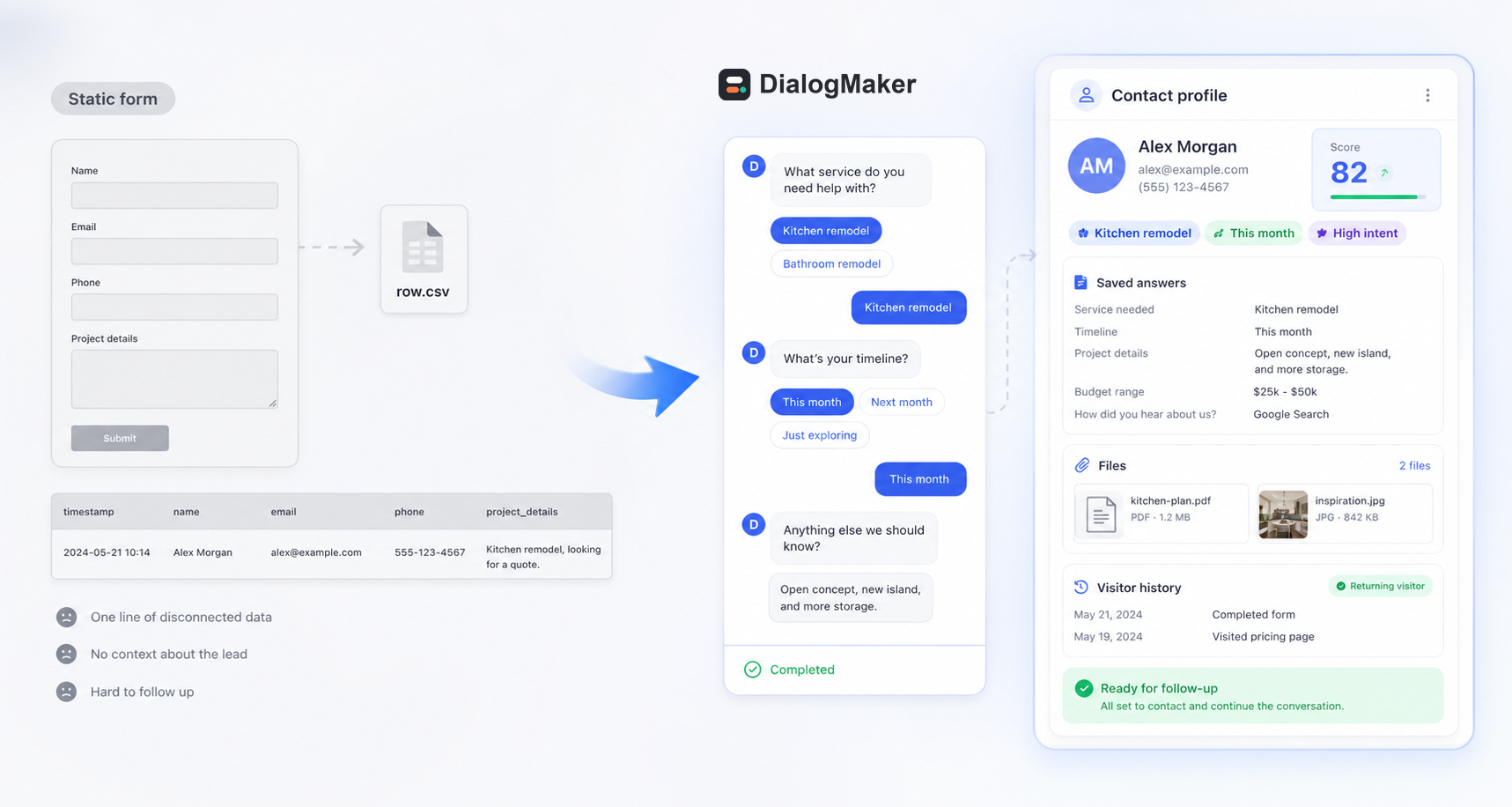
Static forms are direct, but they can feel heavy when a visitor has to answer many fields at once. Conversational forms help break that request into smaller decisions while still collecting structured data.
In a typical form tool, the response lands like a gray CSV-style row. In DialogMaker, the answers become a complete contact profile your team can actually use.
Typical builders
alex@example.com
(555) 123-4567
DialogMaker is not trying to be every form tool for every use case. It is focused on website lead workflows where the next step matters as much as the submission.
FAQ
Answers for teams replacing static forms with guided website intake flows.
A conversational form builder is software for creating forms that ask one question at a time in a guided, chat-like flow. Instead of showing every field at once, the form moves the visitor through focused prompts and records each answer.
A regular form usually shows a static set of fields on one page. A conversational form presents questions step by step, can branch based on previous answers, and often feels closer to a website chat or guided intake.
Yes. DialogMaker is built for website lead capture, so you can use a no-code website widget or share a public workflow link depending on how you want visitors to start the flow.
Yes. You can ask qualification questions, collect fit and urgency signals, and use lead scoring where appropriate so your team has more context before following up.
DialogMaker saves answers to a contact profile with history, notes, tags, and follow-up context. That gives your team a clearer starting point than a disconnected submission notification.
Start with a lead capture workflow that collects answers, saves the contact, and gives your team better follow-up context.