Website design intake form template for scoping real web projects

Collect the context a web design agency, freelancer, or studio needs before a discovery call or proposal: goals, audience, current website, competitors, pages, content, brand direction, technical needs, budget, timeline, and decision process.

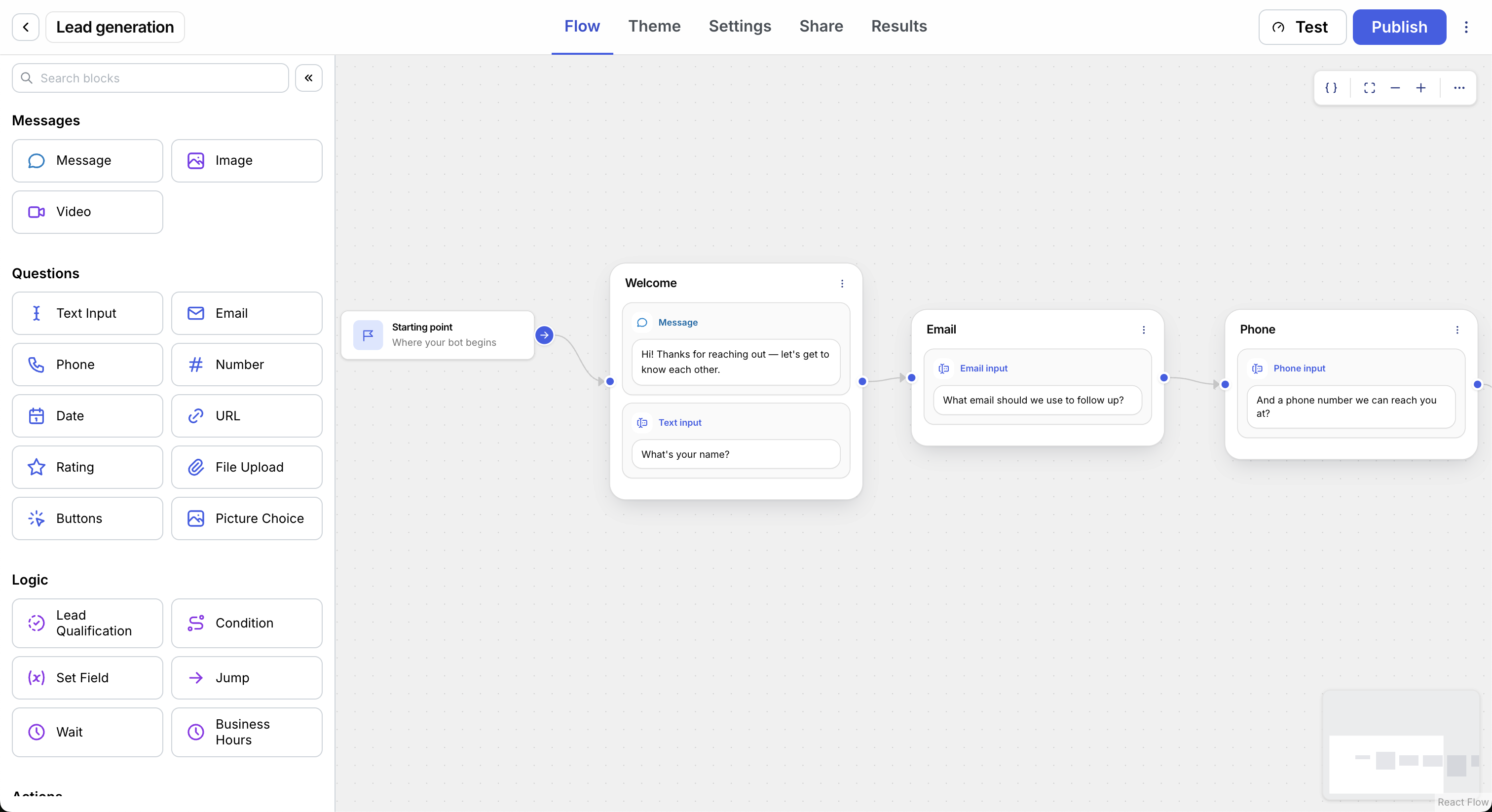
Website intake flow builder showing lead qualification questions for a web design project

What is a website design intake form?

A website design intake form collects the details a designer or agency needs before scoping a web project. It turns a vague request like “we need a new website” into a clear picture of the business, audience, goals, current site, content, design direction, technical needs, budget, and launch pressure.

The form should capture the facts that change scope: whether this is a new build or redesign, who the site needs to serve, which pages and features are needed, what brand and content assets exist, which tools or access details matter, and who approves the project.

Get enough to scope the project

A web design intake form should not feel like a full proposal request, but it does need more than a name, email, and message. Ask for the people, project facts, audience context, creative direction, and constraints that change the next conversation.

  1. 1 Identify

    Who is asking

    Capture the lead and the decision path.

    • Name Contact
    • Email Reply path
    • Company Account
    • Approver Decision
  2. 2 Frame

    What needs building

    Understand the project, users, and current website context.

    • Project type Build path
    • Current URL Audit
    • Target audience Audience
    • Competitors Market
    • Pages Size
    • Goals Outcome
  3. 3 Qualify

    What changes scope

    Qualify readiness before promising a proposal path.

    • Content readiness Assets
    • Brand/style Direction
    • Integrations Systems
    • SEO/analytics Marketing
    • Domain/CMS Access
    • Budget range Fit
    • Launch timing Urgency

Copy these website design intake questions

These are the core website design intake questions this template should start with. Use them as-is, then add branches for ecommerce, landing pages, redesigns, SEO projects, or retainers.

Use this template in DialogMaker

Copy/paste version

  1. What is your name and company?Creates the contact and account context.
  2. What email should we use for follow-up?Gives the agency a reply path.
  3. What kind of website project is this?Separates new sites, redesigns, landing pages, and retainers.
  4. What is the current website URL?Shows existing positioning, content, and technical context.
  5. What should the new website accomplish?Connects the request to leads, trust, hiring, sales, or support.
  6. Who is the website for?Clarifies the target audience, user intent, and buyer context.
  7. Which competitor or inspiration sites should we review?Shows what the client likes, dislikes, and needs to stand apart from.
  8. What brand, style, or visual direction should guide the design?Captures tone, colors, typography, imagery, and visual boundaries.
  9. Which pages or sections do you expect?Helps estimate scope before a proposal.
  10. Is copy, imagery, and branding ready?Surfaces content readiness and asset gaps.
  11. What integrations or tools need to connect?Captures CRM, email, analytics, scheduling, forms, and CMS needs.
  12. What SEO, analytics, or marketing requirements should we account for?Surfaces keywords, tracking, conversion goals, and campaign needs early.
  13. Who owns the domain, hosting, and CMS access?Flags technical handoff needs before launch planning starts.
  14. What budget range should we plan around?Qualifies fit before deep discovery.
  15. When do you want to launch, and why?Separates flexible timelines from deadline-driven projects.

How to create a website design intake form in DialogMaker

Launch the first version quickly. Start with the core questions, add the branches that match your services, and publish it where prospects ask about a new website.

  1. Start from a template

    Begin with contact, company, project type, current site, goals, and audience.

  2. Add branches

    Show different follow-ups for redesigns, ecommerce, landing pages, SEO, retainers, or technical handoffs.

  3. Publish and review

    Embed the flow and review every intake with the contact history attached.

Turn a website questionnaire into a scoping-ready lead

Searchers do not only need a web design form. They need the same fields asked in an order that qualifies fit and gives your team useful context.

Static website questionnaire

NameEmailCurrent websiteProject typeWebsite goalsTarget audienceCompetitorsBrand directionPagesContent readinessSEO or analyticsDomain and CMS accessBudgetLaunch date

Every field appears at once, so a small landing-page request has to read through full redesign, SEO, and technical handoff questions.

DialogMaker guided website intake

What kind of website project is this?

Redesign New site Landing page

Redesign

What should the new site accomplish?

More qualified demo requests and clearer proof.

Who is the website for?

B2B operations leaders comparing service partners.

Is copy, imagery, and branding ready?

Copy in progress Assets ready

Website intake results view

Maya Chen qualified

Submission summary

Status
qualified
Started
Today, 9:22 AM
Last activity
Today, 9:31 AM
Files
3 uploaded

Answer columns from the submitted website intake

Project type
Redesign
Website goals
Demo requests
Target audience
B2B operations leaders
Brand direction
Clear, credible, technical
Content readiness
Copy in progress
Technical access
CMS access available
Budget range
$15k-$25k
Launch timing
Q2 launch

Customize the template for your agency

Keep the core intake structure, then swap in the paths that match your services, technical handoff requirements, and proposal workflow.

Match your offer

Add paths for redesigns, landing pages, ecommerce, SEO projects, accessibility work, migrations, or ongoing retainers.

Qualify the scope

Ask about audience, competitor examples, page count, content readiness, technical access, budget, and launch pressure before offering a call.

Route the next step

Send strong-fit projects to discovery and send smaller requests to a faster follow-up path.

Website design intake form basics

Should a web design intake form ask for budget?

Yes, but use ranges. A budget range helps an agency suggest a realistic scope without forcing the prospect to know the exact cost upfront.

Should it ask for the current website URL?

Yes. The current URL gives your team context on positioning, content, technical complexity, and what the client may mean by redesign.

How many questions should it have?

Start with 12-16 core questions. Add branching when a prospect selects a specific path, such as ecommerce, landing page, redesign, SEO, or migration work.

Is this different from a client intake form?

Yes. A general client intake form works across service businesses. A website design intake form focuses on audience, pages, competitors, brand direction, content, assets, integrations, technical access, and launch constraints.

Read the general client intake form guide.

Start with a guided website intake flow

Collect better web design project details, qualify fit earlier, and give your team enough audience, creative, technical, and commercial context to send a useful next step.

Use this template